Admin Guide
Everythere there is to know about being a Roulette Admin
The following part describes everything there is to know about the operational side of Roulette Rivals. Roulette admins are the ones ensuring the tournament runs smoothly and are administrating matches. Any new or prospective admin should read this page fully to grasp the knowledge required to fill the role. Subsequently, it serves as a reference if the admin is unsure about anything. If there are any further questions, the rest of the Roulette admin and Server admin team will be happy to help.
The following definitions will be used throughout this guide:
Tournament Definitions
| Term | Link | Definition |
|---|---|---|
| Rules | docs.f7sc.com | Page where all Rules for Roulette Rivals are listed |
| Active Format Page | Tournament Formats | Page with the currently active format, accessible from the Tournament Formats page in the rules |
| Hitmaps | hitmaps.com | Site by MrMike which has interactive maps for all missions in the game |
| Hitmaps Roulette | roulette.hitmaps.com | Subdomain of Hitmaps on which Roulette spins can be generated. This is used for all Roulette Rivals matches |
| Hitmaps Tournament page | tournaments.hitmaps.com | Subdomain of Hitmaps which handles the infrastructure of Roulette Rivals. Here matches are scheduled and tracked |
| Shoutcast | - | A broadcast of a match commentated by at least one shoutcaster. |
Discord Definitions
| Term | Channel | Definition |
|---|---|---|
| DM | - | Direct Message, specifically the function on Discord to send a message to another user |
| RR Chat | #rrxx-chat |
Discord channel where talk about the ongoing tournament takes place |
| Matchups Channel | #rrxx-matchups |
Discord channel where matchups and admin messages during matches are posted |
| Info Channel | #rrxx-info |
Discord channel where links to the rules and brackets can be found, as well as the schedule in which the tournament should progress |
| Streams Channel | #rrxx-streams |
Discord channel where starting matches are announced and promoted with their shoutcast |
| Admin Chat | #rr-admin-chat |
Discord channel where Roulette admins organize the administration of Roulette Rivals matches |
| Shoutcaster Chat | #shoutcaster-chat |
Discord channel where Shoutcasters organize the shoutcasting of Roulette Rivals matches |
General Guidelines
As it is an executive role, Roulette admins represent the server. They are the authority on all things concerning the operative side of Roulette Rivals tournaments. By default, they are perceived to speak not only for themselves but for the entire team of Roulette admins. More care needs to be taken when individual opinions are expressed, and it needs to be made abundantly clear when this is the case. Roulette admins should be aware of these things and therefore hold themselves to a higher behavioural standard than other community members. They may also not abuse their permissions and especially not ping roles without permission in cases other than during the work outlined here.
Not all rules are specified explicitly in this guide and they may also change over time. Every admin should therefore have a good knowledge of the current rules found on this website and have fully read through them once.
Messages
A crucial part of administrating is the communication, which needs to be clear and frequent if necessary. Most standard communication is automated by the HITMAPS bot, but in special cases, like photofinishes or crashes, the admin needs to communicate announcements to the players. This communication is to be done through the matchups channel.
Throughout this handbook, some messages will be listed with its requirements, as well as example messages. Administrating always has a personal touch, this is just the author's interpretation of each case, an admin should not feel bound by these. As long as an admin's messages include all crucial details that are respectively listed, they can format the message however they see fit.
Additionally to the respective content, the first message an admin writes concerning a specific case, should start with a ping to both players to notify them.
@In4Fun / @Scruffy
Scheduling
Roulette Admins have the responsibility to try and ensure that all planned matches are being played in a timely manner. They are the point of contact for participants to schedule their matches and have to watch over deadlines and unscheduled matches.
Before any match can take place, participants need to agree on a date and time, as well as decide on their map bans and picks. As soon as this is done, participants should contact any Roulette admin with these details. If a Roulette admin receives such a message, granted the date is within the tournament schedule (is this not the case, see Late Matches), they should then schedule the match. To do this, they need to visit the Hitmaps tournament page and find the match that is concerned, then click on "Manage Date / Maps". An example of the menu that then opens up is shown below.
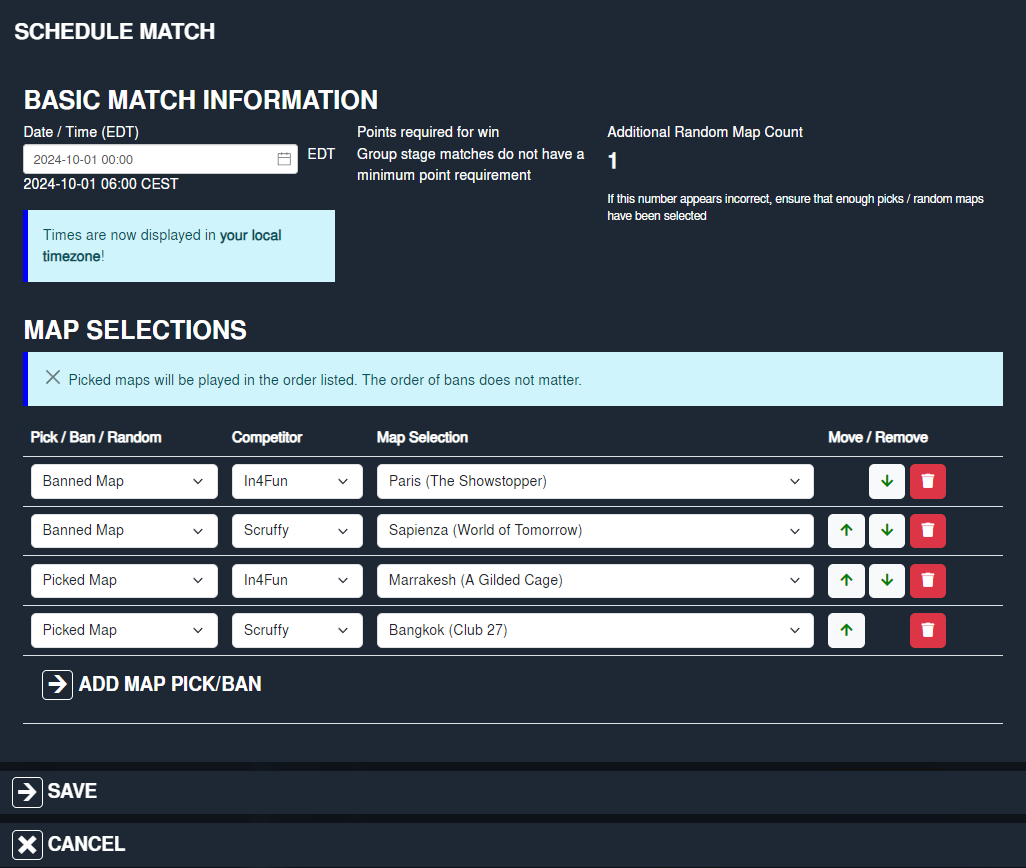
As a first step, the match date and time should be inserted in the local timezone of the Roulette admin. This might need to be converted from the time the participant gave. Afterwards, the participants banned and picked maps should be selected, normally first all bans and then all picks. Regardless of how and how many maps were chosen, the order in which the maps are played might differ from the pick order. Reference the Active Format page if you are unsure about the order of play. This culminates the process of scheduling and the changes should be saved. Possible random maps do not need to be manually inserted, as Hitmaps automatically does so.
If a map has been chosen previously by a participant, the scheduling page will issue a warning indicating so. This might be permitted by the format in the given match, but if it is not, the Roulette admin should inform the participant to sort the issue and choose a different map.
Deadlines and process for late matches
The schedule in which the tournament should progress is written down in the info channel or under "Deadlines and Inactivity" in the Active Format page. There are formats like a Swiss Stage, where deadlines are immovable and no late matches are possible. In other formats like an Elimination bracket or a KO Stage, ideally, but unrealistically, all matches would happen on or before the dates stated. If a Roulette admin receives a scheduling request with a date behind schedule, it is at their discretion to decide if this should be allowed. Matches one or two days late are normally not a problem, as long as it can be expected that the respective participants are able to catch back up to schedule, for example by pre-scheduling with their next prospective opponents. This necessity should be pointed out to them.
If the Roulette admin thinks the match would let the tournament fall too far behind schedule, or is unsure about it, they should consult the Admin chat. If the consensus is that the match should not be allowed to happen at the given date, the participants should be given a chance to agree on a potential earlier date. Should they fail to do so, to keep the tournament on track, one participant needs to forfeit the match. This should be the player that caused the scheduling issue by limited availability and/or long response times. Is this not clear and does neither player concede that it was their fault, the Roulette admin team should request screenshots of the players DMs to judge who shall forfeit the match. If after this there can still be no judgement made towards either side, both players will forfeit the match.
Measures to avoid falling behind schedule
To prevent falling behind the schedule in the first place, participants are required to proactively schedule their match as soon as they know their next opponent, at most within 48 hours. This should be regularly checked by the collective of the Roulette admin team or ideally by a few designated few admins. If a match is expected not to meet or has already not met this limit, a Roulette admin should contact both players about it, inquiring about the current status and hurrying them along. The admin should inform the Admin chat if they do so, also giving an update if this issue is resolved. Does this stay futile, further measures should be taken, including warnings to the player who is at fault for the match not being scheduled yet, this can also be both. Once an additional 24 hours after the limit have passed, a forfeit may be issued to the player who is judged to be at fault. An exception can be made if there are good reasons for the match not being scheduled yet, and it can be reasonably expected that the match is scheduled afterwards, as well as the players being able to catch up with the caused delay.Similarly, Roulette admins should get active if they notice a match will likely fall behind schedule. The participants should be messaged, if they have not already reached out about it themselves. Whichever admin does so should also inform the Admin chat about it to prevent multiple admins taking care of the same matchup. Together, the players and Roulette admin should talk about the options and try for the match to be held as soon as possible. If the match is expected to be, or already is, so late that following matches are expected to be impacted as well, a plan needs to be formed to catch back up. Is this process not immediately fruitful, the measures for late matches described above should be applied.
Process for the Grand Final
Since the Grand Final is very particular in its requirements, both with its set date and it often being the only match without random maps, a Roulette admin should guide the finalists through this process. For this, they should create a Discord thread in the RR chat for transparency, adding both finalists by pinging them. At first, the players should state the times at which they are available, finding a suitable time. In the interest of maximum viewership, the Grand Final is traditionally held in the European evening, most often around 18-21 Central European (Summer) Time. Is this not possible for the finalists, a different time, best as close to this timeframe as possible, needs to be found.Once a time is agreed on, the Roulette admin should explain the order in which the participants choose the maps (see Active Format Page). They should watch over the following process and ensure that all picks are valid, especially that no banned map or an already picked map is accidentally chosen. As a help to the finalists, the Roulette admin can occasionally summarize which maps are left in the pool.
Shoutcasts
Roulette Admins are responsible for coordinating shoutcasts and assigning casters to their matches.

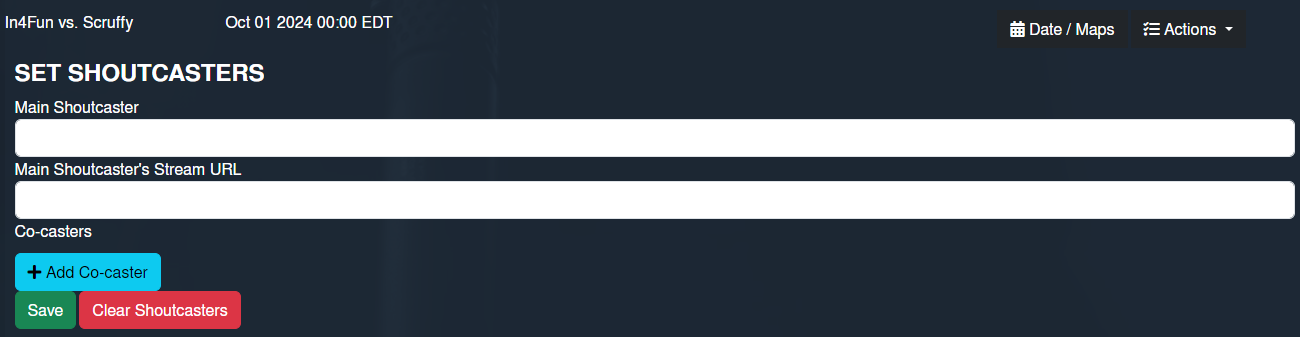
As many matches as possible should be shoutcasted. The assignment of these casts happens by shoutcasters declaring their intent in the Shoutcaster chat. Whenever this happens, or the caster changes, an admin should update the match on the Hitmaps tournament page with the new caster(s) whenever they see a change. This can be done by clicking "Actions" and then "Set Shoutcasters" next to the given match. An example of the mask which opens up can be seen on the right.
Casters should then be informed that the request has been approved and processed, for example a simple "thumbs up" reaction on that specific message is sufficient.
Ideally, a given match gets claimed in ample time before it is scheduled to happen. If that is not the case, 30-60 minutes before match start, an admin should remind the shoutcasters that an unclaimed match is happening soon with a message and a ping. For example:
Any @Shoutcaster can do In4Fun vs. Scruffy?
This often leads to a caster spontaneously taking a match. If that is not the case, an admin should ask if anyone is willing to offer up a "Silent Cast". This means an admin or shoutcaster sets up a cast as normal, but lets it play out without talking. Since this requires no further attention from anyone, often someone who is not able to shoutcast may be able to do this. A silent cast offers less of an experience for spectators, but a VOD of the match will still be available. If still no caster can be found, a match can also take place without a shoutcast. The admin then should provide the viewers with the overlay link instead of a shoutcasters stream (see Before the match).
Special peculiarities for the later tournament
While in the early days of a RR, espeically with bracket formats, days are often overflowing with matches and it is hard to find a caster for all of them, the opposite ratio is true for the later stages of the tournament. There are few matches left and often more casters interested than spots available for these high-stakes matches. Therefore, after a certain point, matches will not automatically go to those who claimed it first, but assigned by admins. These decisions can be done by whichever admin is available and feels responsible, but best is if there is a designated admin for the whole tournament for this, thereby ensuring reliability and timeliness. The point from which onwards this applies could be a specific round or any point that admins choose, normally when there are around 10 matches left to play in a regular RR tournament (often earlier in RRWC). When that point is reached, it should be announced with a message in the Shoutcaster chat.Afterwards, multiple casters can express their intent for any given match. Matches regularly often have 2 casters at maximum, but especially in these late stages this can be exceeded at admin discretion, if it is in the best interest of the cast. But most often if there are more than 2 interested casters, the admin needs to make a decision. This should be based on the following criteria:
-
Amount of casts in that tournament: Casters who greatly helped the tournament by taking a lot of casts early, should be rewarded by being allowed more slots in the later stages as well.
-
The quality of casts in that tournament: If a caster has by general opinion shown excellence, they should receive more slots.
-
Amount of recent casts: As many casters as feasible should have a chance to cast a high-stakes match, therefore a certain variety should be ensured.
In ample time before a match happens, at least a few hours, ideally more, the casting lineup for that match should be announced in the Shoutcaster chat.
Special peculiarities for the Grand Final
The Grand Final is usually the only match with multiple rotating teams of shoutcasters, due to its prestige and length. As soon as a time for the Grand Finals is determined, an admin, simplest the same who coordinated it with the participants, should make a post in the Shoutcaster chat asking who is available and interested in taking part. Especially in regular RRs it can happen that the last match before the Grand Final is quite close to the final day, therefore the point at which the Grand Final time is determined will likely not leave enough time for proper execution of this process. In this case, an admin should discuss possible times with the remaining participants a few days ahead of the final day and already post the above.Once enough time has passed, the admins should collectively evaluate the candidates which expressed interest. This should happen by similar criteria to the above (see Late Tournament), disregarding amounts of recent casts. While selecting the teams, even if all individuals are decided, special attention should also be paid to the distribution of these casters among the teams, prioritizing maximum synergy in the eyes of the admins.
Administrating Matches
This section guides a Roulette admin through the process of administrating a regular match and should be the baseline. For events that can happen during matches, refer to Events during the match.
Claiming matches

Every match needs to have an admin, which is assigned in a process similar to shoutcasters. Is an admin willing to claim a match, they need to write this in the Admin chat. Additionally, they should use the Hitmaps tournament page to select themselves as the admin for this match, by clicking "Actions" and then "Set Match Admin" next to it. An example of the mask which opens up can be seen to the right.
Does a match not get claimed in ample time, a reminder with a ping should be sent out 30-60 min before match start. For example:
Any @Roulette admin can do In4Fun vs. Scruffy?
This will often lead to an available admin taking the match. Is this not the case, the match needs to be delayed until an admin is found. The participants should be quickly informed of this by any admin. If waiting for an admin was not, or is not expected to be, fruitful, the participants unfortunately need to reschedule the match. Eventual deadline breaches cannot be held against the players in this case, as it is not their fault.
Spin page

The spin page is the most important tool in administrating matches. It can be found by visiting the Hitmaps Tournament page and selecting "Match Admin Panel" next to it.
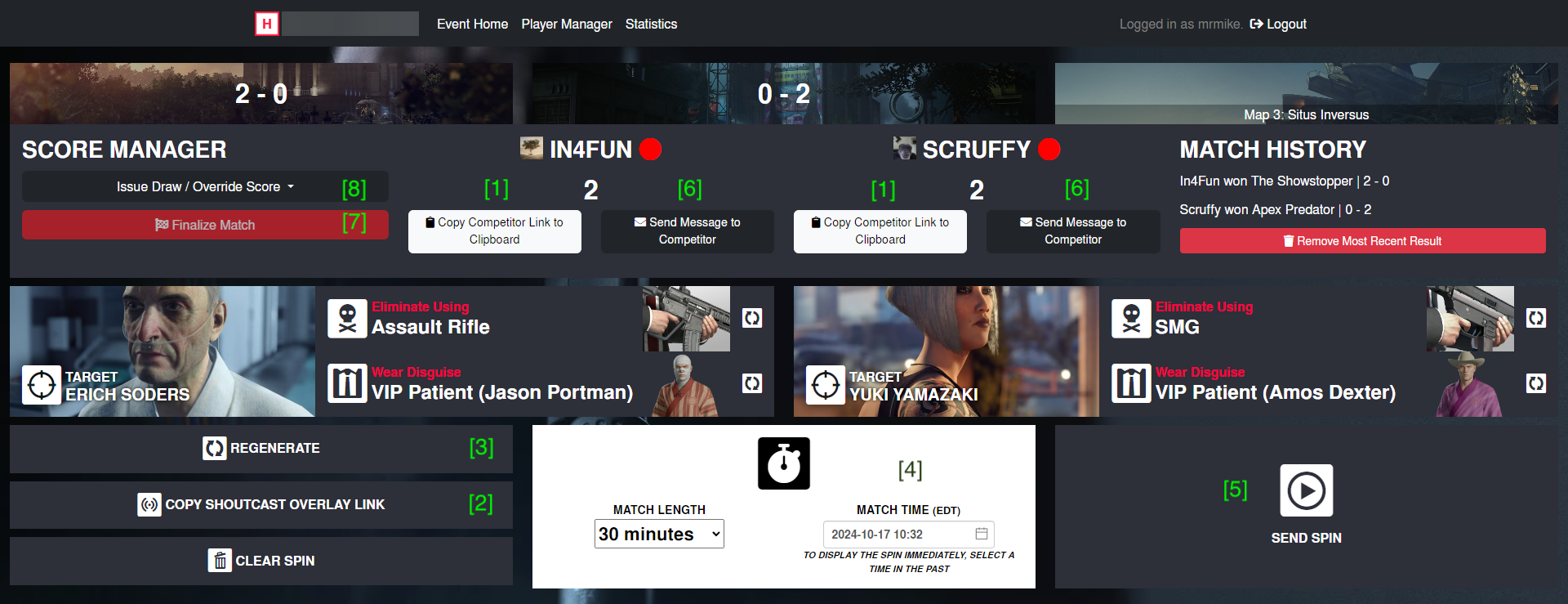
For illustrative purposes, an example spin page is shown below, which will be referenced with the assigned numbers for the remainder of this section.
Before the match
Ahead of the match, the first step for the designated match admin is to open the admin page of the respective match. Then, they need to send the participant page links to the players found here, which can be copied by clicking the respective button on the admin page 1, then pasted into a Discord DM. Ideally, this happens around 15 min before the match, when participants also get the automated reminder in the matchups channel.
The shoutcaster and their co-casters need to receive the overlay link 2 by the same process as above. In the last step, once the shoutcaster has started their stream, the admin should announce the match starting in the streams channel. This should contain the title of the round, names of both players, as well as the shoutcaster with their co-casters, their stream link, and a ping to the "Tourney Matches" role, example below.
LB Round 7 - In4Fun vs. Scruffy @Tourney Matches
If one of the players does not show up on the scheduled start time, indicated by not having opened the spin page (red circular indicator next to their name on the spin page), not having gone live, and not responding on Discord, a 15 min grace period starts. Does the player show up within the period, the match can start as soon as both players are ready. Does the player not show up, that player has to provide a reasoning for the no show to an admin. Is that reasoning provided and deemed to be reasonable, the players are encouraged to re-schedule, provided there is enough time in the round and they can find a time soon after the original date (also see the Late Matches section). Is a re-schedule not feasable, the reasoning not deemed acceptable, or not provided at all, the offending player recieves a forfeit loss for this match. Does a no show occur multiple times from the same player in the same tournament, harsher measures like a disqualification can be taken.
During the match
Between maps
Any time before the match is scheduled to start, ideally up to 15 minutes before, at the latest a few minutes, the match admin needs to prepare the first map by sending a spin. An admin may not curate a spin but must always work with the spin that is displayed, which is automatically checked by Hitmaps for legality. The admin should still look out for the following:
- Spins with conditions that are known to cause issues for one of the players. In the most famous, but now obsolete, example of this, some players experienced crashes if leaving the Chongqing facility as Facility Analyst.
- Spins that are impossible to complete. This can at the moment of writing only happen in extremely rare cases on Berlin by all five kill conditions forcing the player to bring an item in their loadout (Silenced Pistol, Loud SMG, Large Silent Firearm, Fiber Wire & Impact Explosive).
If the admin is still unsure if a spin is legal or not, they should consult the Admin chat (or a singular admin if one of the players is an admin) or check the rules, specifically the "Spin Conditions" page.
Is the spin not valid, the admin needs to take an action to make it legal. If the issue is only a single method or disguise, the respin icon next to that condition should be pressed until the spin is legal. In all other cases where not a singular condition is to blame, the entire spin should be redone by pressing the regenerate button 3.
Now, the admin should check if the timer 4 is set to the match starting time and if not change it, then send the spin 5, initiating a countdown. For any maps beyond the first, the timer should be set so that the players have a sufficient break, normally between 2:30-4:30 minutes, depending on the admin's and players preferences. If anyone involved needs a longer break they can request this with the match admin, who should grant it, provided it is not unreasonable. Has a player not moved on to the next map when there are only 30 seconds remaining, the timer should be extended and the player informed about the previous map being over. Should the match go on for a long time, like a Grand Final, the admin should also plan some longer breaks in advance and announce when they will be held.
If a player finishes the map with a valid attempt and no event like a photofinish will occur, the admin should accept the Done press of the player and repeat the process above, should the match not be over.
During a map
While a map is ongoing, the admin should pay close attention to both players. Sometimes a player will, accidentally or on purpose, breach the rules, in which case the admin must be ready to take appropriate action. By far the most common case is a player making it impossible for themselves to complete the spin with the correct conditions without restarting. This could for example happen by killing a target with the wrong method or disguise, or knocking out a target with a no pacification condition. The admin should then immediately inform the player of this, using the messaging function on the spin page 6. Is the player unresponsive to this, other means of communication, such as Discord DMs, should be used to try and reach them. Do they not acknowledge the rule breach and finish their attempt, this attempt is invalid and that player's Done press has to be rejected.
If a kill including a target animation and a disguise change by the player happen in close succession, it may not be perfectly clear if the kill was done in the correct disguise. In these cases, the disguise texture worn at the exact frame the target's death animation finishes is the one considered for that kill (Erich Soders is an exception, refer to "Spin Conditions"). Most often this can be simplified by checking if the Experience Points for "Fresh Disguise" or for "Target Eliminated" are awarded first by the game. But if this can not be used, such as when the Hitman servers are delaying this information, the above rule is what counts. The admin may need to check the VOD to determine if the kill was done correctly or not, and if not, inform the player as described in the paragraph above.
On Berlin (Apex Predator) specifically, due to the nature of players choosing which targets to kill with which method and disguise combination, it can be hard to keep track of which conditions have been fulfilled for the admin and viewers alike. Therefore, the admin has to tick the respective box on the spin page below each kill condition whenever a kill is completed, which will mark this on the overlay and therefore show up on the broadcast.
Do any issues beyond the gameplay arise, like crashes or stream outages, these are covered in Events during the match.
After the match
As soon as one player reached the score required to win, there are no more maps to play and the match is complete. The last crucial thing to do is to the confirm the result to the system 7.
Events during the match
Photofinishes
Most often, the winner of a map is clear, but if both players finish quite close together, loading times might have been the deciding factor. To account for this, in close cases a Photofinish (PF) will be conducted. If the difference between the finishing times of both players, which is displayed on the admin page, is smaller than a certain amount of time defined in the rules (refer to Additional Information), the result is not yet determined, and the admin has to conduct a PF. If the admin determines it to be possible that the respective PF window will be met by the second player, they need to wait it out, only then potentially accepting a done press if it is not a PF.
General Process
The first thing the admin should do is inform the players and spectators that a photofinish is being conducted by posting a message in the matchups channel. This should always contain the finishing time difference and which player finished first, for example:
Photofinish, please stand by. In4Fun exited 2.48 seconds earlier.
The admin should then open the VOD of the shoutcast to count the loading times. If there were technical issues during the cast that would make the VOD for that map unsuitable to count the loads, the admin must use the seperate VODs of both players.
Now the admin needs to count as precisely as possible how many loads each player had and how long these each took to calculate the total loading times. The start of the loading screen is defined as the moment the player presses "Play" on the mission planning screen or "Restart Mission" on the pause screen, indicated by the loading indicator in the bottom right appearing. The load ends at the exact moment the loading screen switches to black before playing the starting cutscene.
The simplest and most common way to count the loads is to skip through the VOD using the arrow keys to locate the loads of both players. These are then each played from start to finish and their length determined using a time keeping tool like a phone stopwatch or a program like Livesplit. If using a time keeping tool with a pause function, this can be used to directly get the total length of all loads. Otherwise a tool like a calculator needs to be used to sum up the individual loads.
Once the total loading times are calculated, the difference between them can be subtracted from the finish time difference to get the adjusted finish time difference. Whoever leads by this metric wins the map, if it is not within the tie window. Is the result already becoming clear during the calculation of the PF, for example because the other player cannot catch up any more, the admin can abort the calculation and additionally reason why that player won the map. For example:
Scruffy loaded 3 time for a total of 9.2 seconds.
In4Fun's first 2 loads total to 12.8 seconds.
Scruffy cannot catch up, therefore In4Fun wins Bangkok.
Is the final result not clear and quite close, especially within or around the tie window, refer to Close cases. In any other case, the result should be announced in the matchups channel and the done press of the winning player accepted on the admin page. This message should contain how often each player loaded, the total loading time to a precision of 1 decimal if using a stopwatch, what the adjusted finishing time difference is, and who wins the map. For example:
In4Fun loaded 1 time for a total of 4.9 seconds.
Scruffy loaded 3 times for a total of 13.2 seconds.
Scruffy wins Bangkok by 5.8 seconds.
Close cases
Is the result so close that inevitable inaccuracies in the calculation could lead to a different result, especially if the adjusted lead is 5 seconds or less, the admin has to be extra careful and sure of the result. This also applies if the admin is unsure of the result for other reasons.
In those cases, if the admin has access a more precise way of measurement available, for example a tool that can go through the VOD frame by frame (frame counting) or a YouTube VOD (using the , and . keys respectively), they should use this way instead to obtain a correct result. Is the result very close to the tie window, the individual player VODs should be used for this method instead.
Details on Frame Counting
If you are interested in setting up and using frame counting, refer to this guide by Moo.
There are available extensions for Chrome and Firefox.
Sheet for inserting counted frames
Otherwise, the admin should ask if any other admins are available to calculate the PF for confirmation, ideally coming to the same conclusion. Is that not the case, it should be recounted by both and possibly more admins until a consensus is found.
If the in this way confirmed adjusted finishing difference is 2 seconds or shorter, the map is too close to call and counts as a tie. After announcing this, the admin needs to give out a tie manually from the drop-down menu in the top left of the spin page 8. The message needs to include all regular elements plus the different result, for example:
In4Fun loaded 1 time for a total of 4.9 seconds.
Scruffy loaded 2 times for a total of 8.6 seconds.
The resulting difference of 1.2 seconds is within the tie window, therefore Bangkok is called a tie.
Waiving
If a player is certain they will not win the PF, they can waive their right to a PF calculation with a message in the RR chat or to the admin stating this. In this case, the admin should abort the PF process and give the win to the other player by informing them of this result in the matchups channel (example below) and accepting the winning player's done press on the admin page.
Scruffy waived their right to a Photofinish, In4Fun wins Bangkok.
Photofinishes with many loads
Most PFs happen when both players are on a very comparable level and have few loads. Therefore, even tho counting a load can take quite a bit of time, normally PFs do not take too long. Nonetheless, they can happen with any number of loads. Does this exceed 3, the admin may use a method of approximation for that player. Specifically, they may assume the average of the first 3 loads is the length of all following loads. Has that player not preloaded (loading into the map and pressing replan before the spin starts), the first load is counted separately, and the average is formed between the loads 2 to 4.
Photofinishes involving a crash
If a PF occurs on a map during which there was a Crash according to the Crash definition, the PF window gets extended to 3 minutes. When announcing the PF this should also be mentioned, for example:
Photofinish, please stand by. As this map involved a crash, the PF window was extended to 3 min.
In4Fun exited 89.42 seconds earlier.
The time during which the crash occurred counts as loading time for the crashing player and has to be considered when calculating. This time period is defined as starting at the moment the crash happened, and ending when the issue is resolved and the loading screen back into the respective map ends.
This rule exists to benefit the crashing player, therefore if the crashing player is the first to finish, most often they have a substantially higher loading time and the result of a PF would be obvious. In this case, the admin does not need to extend the PF window and can give the win to that player after waiting out the regular PF window. Should a finish of the other player occur during the regular PF window, it still has to be calculated.
Crashes
Definition
If a player crashes during a map, the admin has to take appropriate action. A crash occurs when a player cannot reasonably be expected to play the game (Hitman WoA) any more. This is the case if the game suddenly closes itself, but also by other means, such as
- Repeated Hitman server disconnects
- The game being stuck in a loading action (possibly infinitely),
- The player's stream disconnecting (refer to Stream outages) or internet going out
- Other technical issues, such as sudden very low FPS
but only if they happen for an extended period of time.
Keep in mind that players are primarily responsible for their own hardware, so if the specific case could have been avoided, it does not count as a crash.
Action
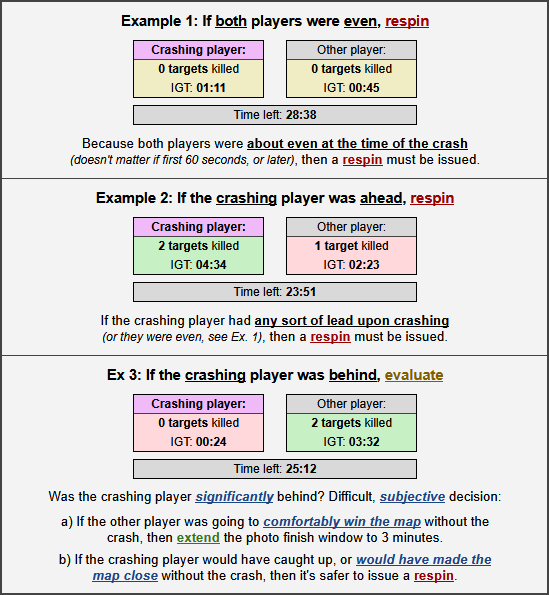
Should a crash happen, the admin should first evaluate if the crashing player was significantly behind. In this case, the map will be played out, but the PF window will be extended to 3 min. Refer to Photofinishes involving a crash on how to process PFs involving crashes. Regardless of a PF occurring or not, the admin should DM the non-crashing player if they finished first, to avoid confusion about the longer wait time due to waiting out the extended PF window.
Was the crashing player not significantly behind, or even ahead, the admin should abort the current spin and issue a respin, communicating this in the matchups channel, for example:
In4Fun crashed, Bangkok will be respun at :XX
Stream outages
This specific case applies if a player's internet is still working, so they can still play the game, but their stream has issues, either being completely down or being unwatchable. If this does not happen very early in the spin, the player should continue play. Players are encouraged to keep a local recording exactly for this case.
No further action is required if
- the stream outage is short enough so that the admin can reasonably deduce what actions the player took while the stream was not watchable
- the stream went down after the last kill, but they could not have reasonably failed to finish any more, and the result is otherwise clear (especially not a PF).
- the other player finishes the map first and the result is clear
If none of this is the case, especially if a kill the player did was not on stream and can therefore not be verified, the admin has to immediately request a local recording from that player to verify the run. If the run is invalid, or the player cannot provide a local recording, they should get their stream back to a regular state as soon as possible and attempt the spin again. Should the other player finish the map first and the result is not clear, such as a close PF, if the run is invalid or a local recording cannot be provided, the player loses the map.
Respins
Should a respin be necessary, the admin needs to click the Clear spin and Generate Spin buttons, and set the new timer for 1-2 minutes out from the current time before sending. Most cases that require a respin are covered in other sections. A specific case is when a sent spin is not compliant with the rules, especially the banned conditions. This most often gets noticed immediately by the players, casters or spectators. As soon as the admin learns of this, a respin should be issued.
Other cases
If an event is not covered by the previous cases, the admin has to make a decision based on similar cases, precedences, common sense and fairness. Is the situation not extremely time sensitive, other admins should be consulted to reach a consensus. In any case it is crucial to communicate fully and openly about the situation in the Admin chat for transparency, explainability and for future reference. Whatever decision is reached, it should be thoroughly reasoned and explained in detail to the participants and spectators in the matchups channel.