Whether you’re a veteran or a first-time player, this page contains all essential information about Roulette Rivals. Be sure to also check the What’s New page for the most important changes since the previous tournament.
¶ Prerequisites
- Participants must own a legal copy of Hitman World of Assassination with access to all Destinations (and their Main Missions) included in the tournament map pool, which by default consists of the 19 maps seen below, if not mentioned otherwise. This is most easily achieved by purchasing the Deluxe Edition, or by purchasing the Standard Edition followed by the Deluxe Upgrade or the Hitman 2 Expansion to unlock the remaining two maps (New York and Haven Island).
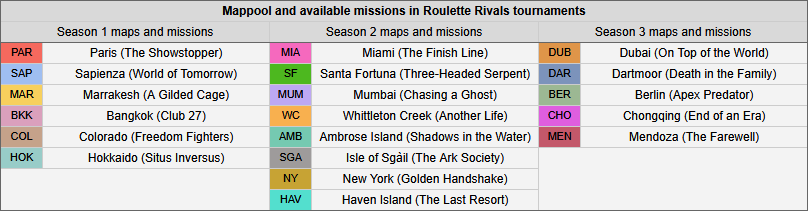
- Participants may use any starting location and items during matches, including all unlockables and DLC content, except for the following time-limited items:
- The Dragon Duck (Twitch Drop)
- Jar of Mom's Spaghetti Sauce (The Eminem vs. Slim Shady Pack)
- Mr. Chainsaw Jr. (The Eminem vs. Slim Shady Pack)
- Participants must livestream all of their matches on either Twitch or YouTube, with past broadcasts saved for at least 24 hours for admin review.
- Streaming on Twitch is preferred. A guide to getting started can be found here.
- Past broadcasts can be enabled on the Stream Settings page; more details can be found here.
- Participants are responsible for ensuring that ads do not play on their stream during a spin.
- Participants must ensure that their gameplay is fully visible and legible on the stream, without overlays or other sources blocking, cropping, or shrinking it.
- Participants are encouraged to also record their gameplay locally in case of stream outages.
¶ Before a Match
Scheduling: Roulette Rivals tournaments consist of matches against different opponents across various time zones. As such, players are expected to be proactive when scheduling matches with future opponents via Discord direct messages (DMs).
-
Regardless of format, the following scheduling procedure applies to all Roulette Rivals events:
- At the start of a new round, or once the next opponent is confirmed, both players are expected to contact each other via DMs. They must agree on a time that suits both parties while remaining within the given deadlines. Players are encouraged to use https://hammertime.cyou/ or Discord's @time feature to generate timezone-accurate timestamps.
- Players then draft maps for the match using the ABBA structure. Player A (the first player listed on the bracket or website) selects one map, Player B selects two maps, then Player A selects one map; this pattern repeats as needed. Draft selections typically begin with bans, followed by picks. A ban prevents a map from appearing in the match, while a pick guarantees that the map will be played. Player A’s first picked map is played first. For more details and examples, see the Tournament Format page in the sidebar.
- Once all maps are selected, one player must send the scheduling information to a Roulette Admin, who inputs it into the scheduler. The scheduler fills the remaining slots with RNG maps, which can be maps that were neither picked nor banned. Players are responsible for verifying that all scheduling information is correct.
-
Tournament deadlines may vary, but once the next opponent is confirmed in a Swiss Stage or bracket, players must submit their scheduling information to a Roulette Admin within 48 hours to keep the tournament moving.
-
Depending on the tournament format, failure to communicate with an opponent, unresponsiveness during scheduling, or delaying the tournament may result in warnings, forfeit losses, or, in severe cases, a tournament ban.
Preparation: Roulette Rivals matches typically last between 30 and 90 minutes and are always overseen by a Roulette Admin (the referee) and at least one Shoutcaster (commentator). Players are therefore expected to be ready at match start and to clearly communicate any issues to the admin.
- Fifteen minutes before the scheduled start, the system notifies the players and the admin sends them a player page containing the upcoming spin and a “Done” button. Players should begin their livestream at least five minutes before the scheduled start time to ensure everything is working properly.
- If a player is unresponsive, the match start may be delayed by up to 15 minutes. After this period, the match may be considered a no-show and postponed or cancelled. Consequences depend on the tournament format, but typically players are not punished for a first offense or if there was a valid reason for missing the match. If no forfeit is issued, players will be asked to reschedule at their earliest mutual availability.
- Players should inform the admin as soon as possible if they cannot attend a scheduled match or if issues arise, and provide an explanation if they miss one.
¶ During a Match
Settings: Once both players are ready, the countdown on the player page ends and the match starts with the first spin. After the spin is revealed, players attempt to complete it with a Silent Assassin rating. Players must ensure the following in-game settings are enabled (a YouTube guide by GKPunk is available).
- Spins must be played on Professional difficulty.
- Saving or loading during spins is not allowed.
- Players may enter a map early to preload or practice, but any attempt that starts before the spin goes live does not count.
- The following HUD elements must be visible at all times:
Objectives: Always On
Picture in Picture: On
Performance / Scoring HUD: On
Challenges HUD: On
Weapon HUD: On
Silent Assassin HUD: On
Difficulty HUD: On - Players may use documents and guides such as HITMAPS.com or the Roulette Guides page at any time. However, receiving help from other people or watching the shoutcast or an opponent during spins is strictly forbidden.
- After completing the “Exit Mission” prompt on a map, participants must click or tap the “Done” button on their player page. Players should remain on the rating screen until the admin verifies the run and updates the score.
- This means that, in Mendoza, players may press "Done" after starting the Tango cutscene. However, the final score must still be Silent Assassin; failing it during the cutscene will still force a restart.
Scoring: Each match consists of multiple roulette spins. Each map has a time limit of 30 minutes, except for deciders in First-to-X matches (for example, Map 6 of a First-to-6), which are untimed. The first player to finish a map earns two points. If neither player finishes within the time limit, both players receive one point. If players finish close to each other, a photo finish may be triggered, which can also result in a draw.
- Mods of any kind, including custom servers, are prohibited.
- Cheating of any kind is strictly prohibited. This includes the use of third-party software, such as macro execution tools.
- Participants must behave respectfully toward other players and admins.
- A participant is required to try their best to complete a spin, even if it appears very difficult. Individual maps cannot be forfeited, only entire matches. Unsportsmanlike behavior, such as deliberately not attempting a spin, may result in penalties up to and including a ban from future competitions.
¶ Disallowed Techniques
Because Roulette is designed around challenge runs, certain techniques and exploits known from speedrunning are not permitted in Roulette Rivals matches. As a general rule, any lure that causes NPCs to follow 47 instead of responding to the initial distraction (such as the Bump Lure) falls under these restrictions.
The following specific techniques are also prohibited:
- Sedative Glitch (Tranq Glitch): Killing a target during a poison animation, or after the body is found to incorrectly retain Silent Assassin.
- Delayed Poison: Sedating or pacifying a target during a poison animation to postpone the kill.
- Direct Poison: Placing a poison vial onto a glass or beverage to cause a target to consume it directly.
- Weapon Lure: Picking up a weapon as a civilian is reporting it, causing them to follow 47 indefinitely.
- Sticky Weapon Lure: Placing a weapon on an item (typically rat poison) and moving while holding it to cause NPCs to follow 47 indefinitely.
- Pickup Glitch: Throwing an item multiple times to make NPCs pick up items in ways not intended by the game.
- Infinite NPC Loop: Causing NPCs to enter unintended, indefinite loops of repeated actions (e.g. pickups or investigations) through exploits.
- Mudshot: Using pause buffering to open locked doors or gates with a firearm in ways that would not normally be possible.
- Cover Aim: Moving 47 unnaturally by aiming, using prompts, or performing other actions while in cover.
- Particle Boosting: Using throwable items or their particles to boost 47 upward.
- Oil Canister Drop: Using an oil canister to drop down a ledge by simultaneously triggering the Spill Oil and Vault prompts.
When ruling on a potential disallowed technique, admins will evaluate whether the action was intentional and whether it provided a meaningful advantage. If both conditions are met, the run is invalid and must be restarted.